
拆迁地球及爱情事故

1675 字
8 分钟
Astro 博客添加 Waline 评论系统,Waline 的 docker 部署
Waline是一款轻量的,快速的,带后端的评论系统,官方提供了多种部署方案以及不同的数据存储可供选择
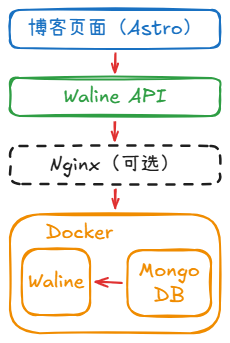
本文选择使用 MongoDB 作为数据存储服务, MongoDB 以及 Waline 均使用Docker部署
其他部署方案以及数据存储服务可以参考官方文档:Waline介绍
架构图如下
0. 准备工作
你需要准备:
- docker环境, 用来部署 Waline 以及对应数据库
- 一个可运行的 astro 项目(可以参考 Astro项目搭建部署 系列搭建一个 astro 博客项目)
1. Mongo 以及 Waline 的 Docker 部署
1. 创建 Docker 网络
用于让 Waline 通过容器名访问 MongoDB
docker network create waline-net2. Docker 部署 MongoDB
docker run -d \ --name mongo \ --network waline-net \ -e MONGO_INITDB_ROOT_USERNAME=DemoUsername \ -e MONGO_INITDB_ROOT_PASSWORD=DemoPassword \ -v /var/lib/mongo:/data/db \ --restart unless-stopped mongo:6TIP
命令项 详情 —name mongo 容器名称为mongo —network waline-net 接入第一步创建的waline-net网络 -e MONGO_INITDB_ROOT_USERNAME=DemoUsername 设定初始用户的用户名 -e MONGO_INITDB_ROOT_PASSWORD=DemoPassword 设定初始用户的密码 -v ${pwd}/data:/data/db 挂载本地的data文件夹到容器的/data/db mongo:6 选择镜像版本为mongo6
3. Docker 部署 Waline
docker run -d \ --name waline \ --network waline-net \ -p 8360:8360 \ -e MONGO_DB=waline \ -e MONGO_USER=DemoUsername \ -e MONGO_PASSWORD=DemoPassword \ -e MONGO_HOST=mongo \ -e MONGO_PORT=27017 \ -e MONGO_AUTHSOURCE=admin \ -e JWT_SECRET=testsecret \ --restart unless-stopped lizheming/walineTIP
命令项 详情 —name waline 容器名称为waline —network waline-net 接入第一步创建的waline-net网络 -p 8360:8360 指定端口为8360 -e MONGO_DB=waline 指定Waline使用MongoDB的数据库名为waline -e MONGO_USER=DemoUsername 连接MongoDB的用户名,可以用2中设定的初始用户用户名,生产环境建议创建单独数据库用户 -e MONGO_PASSWORD=DemoPassword 连接MongoDB的密码,可以用2中设定的初始用户密码,生产环境建议创建单独数据库用户 -e MONGO_HOST=mongo 连接MongoDB的地址,因为接入了Docker网络因此使用MongoDB的容器名 -e MONGO_PORT=27017 连接MongoDB的端口 -e MONGO_AUTHSOURCE=admin 指定在MongoDB的admin数据库验证身份 -e JWT_SECRET=testsecret 一个随机长字符串,用于登录Waline时生成Token lizheming/waline 选择Waline的镜像
2. astro 项目接入 waline
TIP本部分主要参考了这篇文章:Fuwari 接入 Waline 评论系统 ~ 可选是否开启评论
1. Pnpm安装waline
pnpm add @waline/client2. 在 src/components/comment 下新建文件 Waline.astro
---import { commentConfig } from "../../config";
interface Props { path: string;}
const config = { ...commentConfig.waline, el: "#waline", path: Astro.props.path, dark: "html.dark", wordLimit: ["2", "300"],};---<!-- Waline --><div class="relative w-full"> <div id="waline"></div> <link rel="stylesheet" href="https://unpkg.com/@waline/client@v3/dist/waline.css" /> <script type="module" is:inline define:vars={{ config }}> import { init } from 'https://unpkg.com/@waline/client@v3/dist/waline.js'; init(config); </script></div>TIPpath: Astro.props.path 这一行的作用是指明Waline使用文章的path区分不同文章下的评论,不会把不同文章的评论混淆
3. 在 src/components/comment 下新建文件 index.astro
---import type { CollectionEntry } from 'astro:content'import { commentConfig } from '@/config'import Waline from './Waline.astro'interface Props { post: CollectionEntry<'posts'>}
const { id, data, slug } = Astro.props.post
const path = `/posts/${slug}`const url = `${Astro.site?.href}${path}`const comments = data.comments
let commentService = ''if (commentConfig?.waline) { commentService = 'waline'}---{ comments == true && ( <div class="card-base p-6 mb-5"> {commentService === 'waline' && <Waline path={path} />} {commentService === '' && null} </div> ) }4. 修改 src/content/config.ts 中的类型约束
const postsCollection = defineCollection({ schema: z.object({ title: z.string(), published: z.date(), updated: z.date().optional(), draft: z.boolean().optional().default(false), comments: z.boolean().optional().default(true), description: z.string().optional().default(""), image: z.string().optional().default(""), tags: z.array(z.string()).optional().default([]), category: z.string().optional().nullable().default(""), lang: z.string().optional().default(""),
/* For internal use */ prevTitle: z.string().default(""), prevSlug: z.string().default(""), nextTitle: z.string().default(""), nextSlug: z.string().default(""), }),});5. src/types/config.ts 中添加CommentConfig和WalineConfig
export type BlogPostData = { body: string; title: string; published: Date; description: string; tags: string[]; draft?: boolean; image?: string; category?: string; prevTitle?: string; prevSlug?: string; nextTitle?: string; nextSlug?: string; comments?: boolean;};
export type ExpressiveCodeConfig = { theme: string;};
export type CommentConfig = { waline?: WalineConfig;};
type WalineConfig = { serverURL: string; login?: string;};6. src/config.ts中添加commentConfig
import type { ExpressiveCodeConfig, LicenseConfig, NavBarConfig, ProfileConfig, SiteConfig, CommentConfig} from "./types/config";
export const commentConfig: CommentConfig = { waline: { //这里填入#1 Docker宿主机的IP以及Docker中Waline容器的端口 serverURL: 'http://localhost:8360', login: 'enable' }};7. src/pages/posts/[…slug].astro中引入评论模块
---import path from "node:path";import License from "@components/misc/License.astro";import Markdown from "@components/misc/Markdown.astro";import I18nKey from "@i18n/i18nKey";import { i18n } from "@i18n/translation";import MainGridLayout from "@layouts/MainGridLayout.astro";import { getSortedPosts } from "@utils/content-utils";import { getDir, getPostUrlBySlug } from "@utils/url-utils";import { Icon } from "astro-icon/components";import { licenseConfig } from "src/config";import ImageWrapper from "../../components/misc/ImageWrapper.astro";import PostMetadata from "../../components/PostMeta.astro";import { profileConfig, siteConfig } from "../../config";import { formatDateToYYYYMMDD } from "../../utils/date-utils";import Comment from "@components/comments/index.astro";
118 collapsed lines
export async function getStaticPaths() { const blogEntries = await getSortedPosts(); return blogEntries.map((entry) => ({ params: { slug: entry.slug }, props: { entry }, }));}
const { entry } = Astro.props;const { Content, headings } = await entry.render();
const { remarkPluginFrontmatter } = await entry.render();
const jsonLd = { "@context": "https://schema.org", "@type": "BlogPosting", headline: entry.data.title, description: entry.data.description || entry.data.title, keywords: entry.data.tags, author: { "@type": "Person", name: profileConfig.name, url: Astro.site, }, datePublished: formatDateToYYYYMMDD(entry.data.published), inLanguage: entry.data.lang ? entry.data.lang.replace("_", "-") : siteConfig.lang.replace("_", "-"), // TODO include cover image here};---<MainGridLayout banner={entry.data.image} title={entry.data.title} description={entry.data.description} lang={entry.data.lang} setOGTypeArticle={true} headings={headings}> <script is:inline slot="head" type="application/ld+json" set:html={JSON.stringify(jsonLd)}></script> <div class="flex w-full rounded-[var(--radius-large)] overflow-hidden relative mb-4"> <div id="post-container" class:list={["card-base z-10 px-6 md:px-9 pt-6 pb-4 relative w-full ", {} ]}> <!-- word count and reading time --> <div class="flex flex-row text-black/30 dark:text-white/30 gap-5 mb-3 transition onload-animation"> <div class="flex flex-row items-center"> <div class="transition h-6 w-6 rounded-md bg-black/5 dark:bg-white/10 text-black/50 dark:text-white/50 flex items-center justify-center mr-2"> <Icon name="material-symbols:notes-rounded"></Icon> </div> <div class="text-sm">{remarkPluginFrontmatter.words} {" " + i18n(I18nKey.wordsCount)}</div> </div> <div class="flex flex-row items-center"> <div class="transition h-6 w-6 rounded-md bg-black/5 dark:bg-white/10 text-black/50 dark:text-white/50 flex items-center justify-center mr-2"> <Icon name="material-symbols:schedule-outline-rounded"></Icon> </div> <div class="text-sm"> {remarkPluginFrontmatter.minutes} {" " + i18n(remarkPluginFrontmatter.minutes === 1 ? I18nKey.minuteCount : I18nKey.minutesCount)} </div> </div> </div>
<!-- title --> <div class="relative onload-animation"> <div data-pagefind-body data-pagefind-weight="10" data-pagefind-meta="title" class="transition w-full block font-bold mb-3 text-3xl md:text-[2.25rem]/[2.75rem] text-black/90 dark:text-white/90 md:before:w-1 before:h-5 before:rounded-md before:bg-[var(--primary)] before:absolute before:top-[0.75rem] before:left-[-1.125rem] "> {entry.data.title} </div> </div>
<!-- metadata --> <div class="onload-animation"> <PostMetadata class="mb-5" published={entry.data.published} updated={entry.data.updated} tags={entry.data.tags} category={entry.data.category} ></PostMetadata> {!entry.data.image && <div class="border-[var(--line-divider)] border-dashed border-b-[1px] mb-5"></div>} </div>
<!-- always show cover as long as it has one -->
{entry.data.image && <ImageWrapper id="post-cover" src={entry.data.image} basePath={path.join("content/posts/", getDir(entry.id))} class="mb-8 rounded-xl banner-container onload-animation"/> }
<Markdown class="mb-6 markdown-content onload-animation"> <Content /> </Markdown>
{licenseConfig.enable && <License title={entry.data.title} slug={entry.slug} pubDate={entry.data.published} class="mb-6 rounded-xl license-container onload-animation"></License>}
</div> </div>
<div class="flex flex-col md:flex-row justify-between mb-4 gap-4 overflow-hidden w-full"> <a href={entry.data.nextSlug ? getPostUrlBySlug(entry.data.nextSlug) : "#"} class:list={["w-full font-bold overflow-hidden active:scale-95", {"pointer-events-none": !entry.data.nextSlug}]}> {entry.data.nextSlug && <div class="btn-card rounded-2xl w-full h-[3.75rem] max-w-full px-4 flex items-center !justify-start gap-4" > <Icon name="material-symbols:chevron-left-rounded" class="text-[2rem] text-[var(--primary)]" /> <div class="overflow-hidden transition overflow-ellipsis whitespace-nowrap max-w-[calc(100%_-_3rem)] text-black/75 dark:text-white/75"> {entry.data.nextTitle} </div> </div>} </a>
<a href={entry.data.prevSlug ? getPostUrlBySlug(entry.data.prevSlug) : "#"} class:list={["w-full font-bold overflow-hidden active:scale-95", {"pointer-events-none": !entry.data.prevSlug}]}> {entry.data.prevSlug && <div class="btn-card rounded-2xl w-full h-[3.75rem] max-w-full px-4 flex items-center !justify-end gap-4"> <div class="overflow-hidden transition overflow-ellipsis whitespace-nowrap max-w-[calc(100%_-_3rem)] text-black/75 dark:text-white/75"> {entry.data.prevTitle} </div> <Icon name="material-symbols:chevron-right-rounded" class="text-[2rem] text-[var(--primary)]" /> </div>} </a> </div>
<Comment post={entry}></Comment>
</MainGridLayout>3. 注册为管理员账号
浏览器访问:http://localhost:8360/ui/register 第一个注册并登录Waline的账号会被设置为管理员账号,使用该账号可以管理评论及账号
4. 其他的优化项
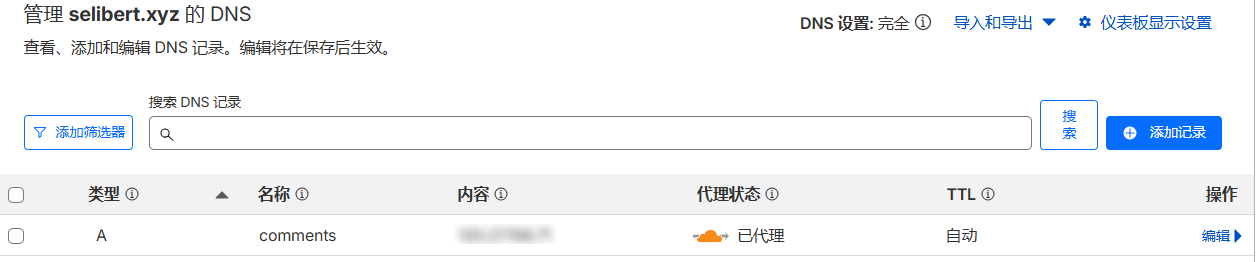
1. 在src/config.ts中,目前的写法宝暴露了IP端口,可以用Nginx反代的方式隐藏
- 在DNS解析添加子域名解析
- 使用CertBot添加Https证书
安装CertBot
sudo apt updatesudo apt install certbot -y申请证书
sudo certbot certonly --standalone -d comments.selibert.xyz- 在Nginx添加对应的server块
# ------------------------------# Waline 评论系统(HTTPS)# ------------------------------server { listen 443 ssl; server_name comments.selibert.xyz;
ssl_certificate /etc/letsencrypt/live/comments.selibert.xyz/fullchain.pem; ssl_certificate_key /etc/letsencrypt/live/comments.selibert.xyz/privkey.pem; include /etc/letsencrypt/options-ssl-nginx.conf; ssl_dhparam /etc/letsencrypt/ssl-dhparams.pem;
location / { proxy_pass http://localhost:8360; # Waline的IP端口 proxy_set_header Host $host; proxy_set_header X-Real-IP $remote_addr; proxy_set_header X-Forwarded-For $proxy_add_x_forwarded_for; proxy_http_version 1.1; proxy_set_header Connection ""; proxy_set_header X-Forwarded-Proto https; }}2. (可选)可以默认隐藏登录按钮,让用户默认以匿名方式评论
---import { commentConfig } from "../../config";
interface Props { path: string;}
const config = { ...commentConfig.waline, el: "#waline", path: Astro.props.path, dark: "html.dark", wordLimit: ["2", "300"],};---<!-- Waline --><div class="relative w-full"> <div id="waline"></div> <link rel="stylesheet" href="https://unpkg.com/@waline/client@v3/dist/waline.css" /> <script type="module" is:inline define:vars={{ config }}> import { init } from 'https://unpkg.com/@waline/client@v3/dist/waline.js'; init(config); </script></div>
<style is:inline>.wl-btn { border-color: transparent; color: transparent; background-color: transparent; cursor: default;}</style> Astro 博客添加 Waline 评论系统,Waline 的 docker 部署
https://yuumiblog.com/posts/blogbuild/blogbuildnote04/